You’re about to print a document. You click Print, and suddenly you see a checkbox that says “Collate.” You pause. Do you need it on or off? What even happens if you click it? If you’ve ever felt confused by this printing option, you’re not alone.
Most people only notice “collate” when printing multiple pages and multiple copies. It looks technical, but the idea behind it is actually very simple. Once you understand it, you’ll never second-guess that checkbox again.
Quick Answer:
When printing, collate means printing complete sets of pages in the correct order for each copy.
What Does Collate Mean When Printing?
Full Meaning
- Collate (printing) = Organize pages into complete, ordered sets for each copy.
Plain-English Explanation
If you’re printing a multi-page document and more than one copy, collating tells the printer to group pages together properly.
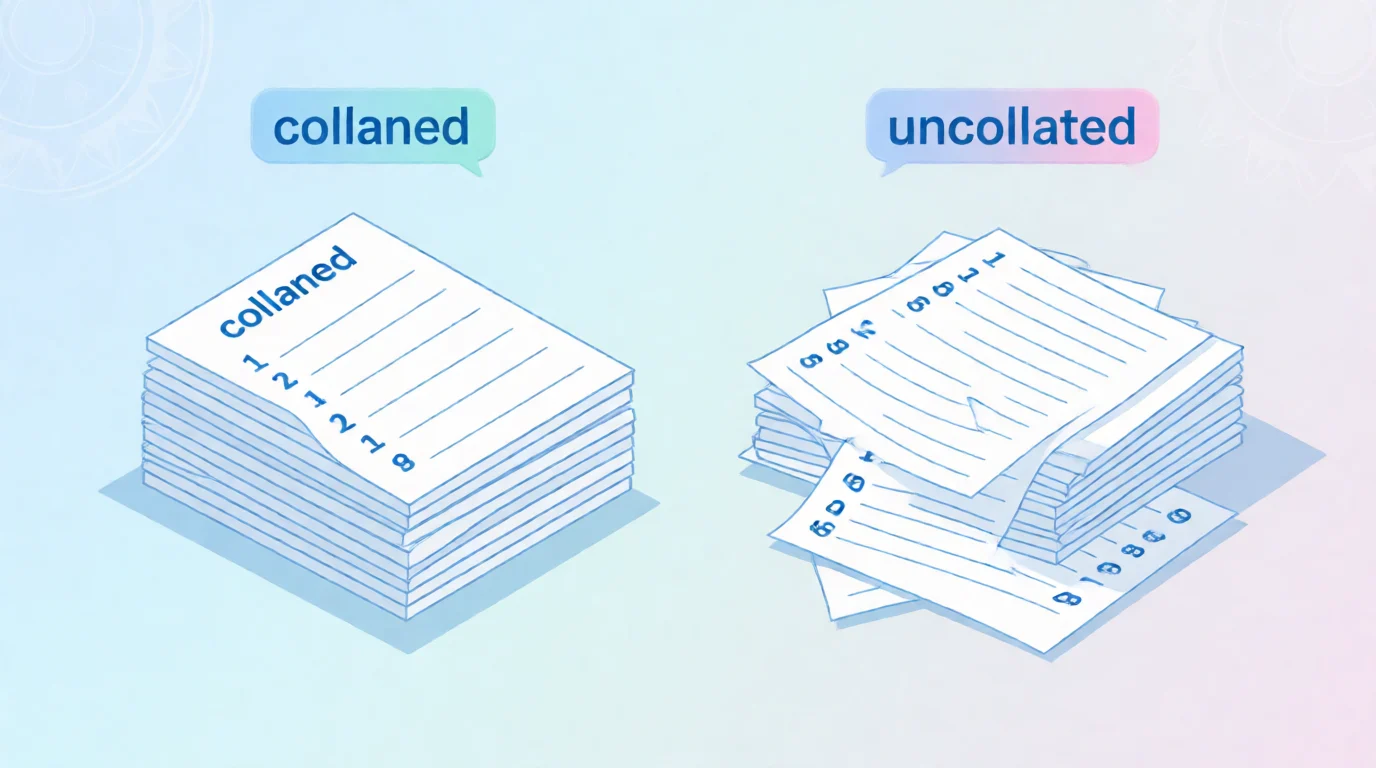
Instead of printing all page 1s, then all page 2s, collating prints:
- page 1 → page 2 → page 3 (copy 1)
- page 1 → page 2 → page 3 (copy 2)
Why People Use Collation
- Saves time sorting pages
- Keeps documents organized
- Perfect for reports, handouts, and booklets
Example Sentence
“Make sure you collate the pages so each student gets a full packet.”
Bold Summary: Collate means printing full, ordered sets of pages for each copy instead of grouping the same pages together.
Collated vs. Uncollated Printing (Key Difference)
This is where most confusion happens. Let’s break it down clearly.
Collated Printing
If you print 3 copies of a 3-page document with collation ON, you get:
- 1–2–3
- 1–2–3
- 1–2–3
Each copy is complete and ready to use.
Uncollated Printing
If collation is OFF, the printer outputs:
- 1–1–1
- 2–2–2
- 3–3–3
You’ll need to sort the pages yourself.
Where You’ll See the Collate Option
The collate option shows up in most printing situations.
| Location | How It Appears | Tone |
|---|---|---|
| Home printers | Checkbox or toggle | Neutral |
| Office printers | Advanced print settings | Professional |
| PDFs | Print dialog box | Neutral |
| Word / Google Docs | “Collate” option | Neutral |
| School printing | Default setting | Practical |
Tone Note: “Collate” is a neutral, technical term, commonly used in school, work, and office settings.
Realistic Printing Scenarios (Examples)
Here’s how collate works in real life:
- printing a 10-page report for 5 people
- printing homework packets for a class
- printing meeting handouts
- printing instruction manuals
- printing legal or business documents
- printing book chapters
- printing training materials
In all these cases, collation keeps pages in order.
When to Use Collate (and When Not To)
✅ Use Collate When:
- Printing multiple copies of a multi-page document
- You want each copy ready to hand out
- You don’t want to manually sort pages
❌ Don’t Use Collate When:
- Printing only one copy
- Printing single-page documents
- You plan to assemble pages yourself
- You need stacks of the same page together
Quick Comparison Table
| Context | Example | Why It Works / Doesn’t |
|---|---|---|
| classroom handouts | collated packets | saves time |
| office reports | collated copies | professional |
| bulk flyers | uncollated | easier stacking |
| one-page print | collate on/off | no difference |
| manual assembly | uncollated | intentional |
Why Collation Matters So Much
Collation may seem small, but it can:
- prevent missing pages
- reduce mistakes
- save hours of manual sorting
- make documents look professional
In offices, schools, and businesses, collated printing is often the default choice because it’s efficient and clean.
Common Mistakes People Make
Here are a few frequent issues:
- turning off collate by accident
- printing 20 copies and getting mixed pages
- not realizing collate only matters with multiple pages
- assuming collate affects layout or formatting (it doesn’t)
Remember: collate only affects page order, not design.
Similar Printing Terms You Might See
| Term | Meaning | When It’s Used |
|---|---|---|
| duplex | print on both sides | saving paper |
| simplex | print one side only | clarity |
| stapling | binds pages together | finishing |
| sorting | organizing after printing | manual |
| booklet | folded page layout | brochures |
Frequently Asked Questions
Does collate matter for one page?
No. Collation only matters when printing multiple pages.
Should collate be on or off?
Turn it on if you want complete sets. Turn it off if you want grouped pages.
Is collate the same on all printers?
Yes. The concept is the same, though the setting location may differ.
Does collating slow down printing?
Slightly, but it saves time overall by avoiding manual sorting.
Is collate used outside printing?
Yes. “Collate” can also mean gathering and organizing information, but in printing it’s strictly about page order.
Why is collate usually checked by default?
Because most people want finished, organized copies.
Why Understanding Collate Helps
Knowing what collate means:
- reduces printing mistakes
- saves paper and time
- makes you more confident using printers
- helps in school, work, and home printing
It’s one of those small skills that makes everyday tasks smoother.
Final Thought
So, what does collate mean when printing? It means printing full, ordered sets of pages for each copy instead of grouping the same pages together.
Once you understand this option, printing becomes faster, cleaner, and stress-free—no more sorting piles of paper by hand.

Stuck on what to say? ReplyResponses.com gives you clever, funny, and savage comebacks for every moment — because silence isn’t golden when you can drop a perfect reply!